
 |
eiktub™ - The Arabic Transliteration Pad |
| Download and Installation | Screen shots | Documentation |
Follow the download and installation instructions below based on your operating system (Windows XP/Vista/7 only).
Installing eiktub™ on Windows Vista and Windows 7
- Click on the download button at the top of this page to download the self-extracting file eiktub_setup.msi from CNET.
- Run the self-extracting file eiktub_setup.msi by double clicking on it.
- Once installation is complete, you are ready to use eiktub™ and create .txt files in Arabic using your English keyboard.
Installing eiktub™ on Windows XP
- Click on the download button at the top of this page to download the self-extracting file eiktub_setup.msi from CNET.
- Run the self-extracting file eiktub_setup.msi by double clicking on it.
- You may be directed by the setup wizard to download and install Microsoft.NET Framework prior to installing eiktub™.
- Once installation is complete, enable right-to-left script support by doing the following:
From the Control Panel Open the "Regional and Language Options" as shown in the Figure below:
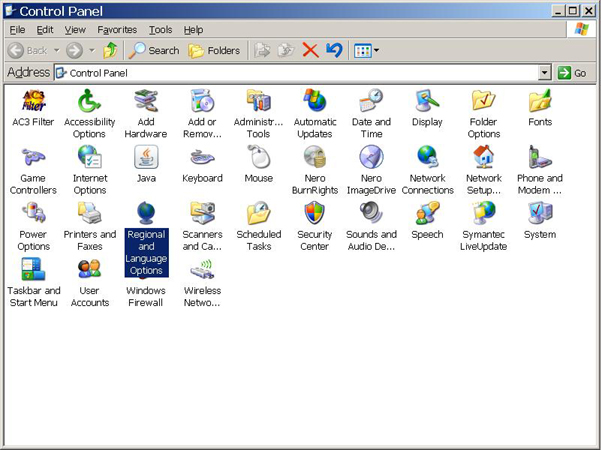
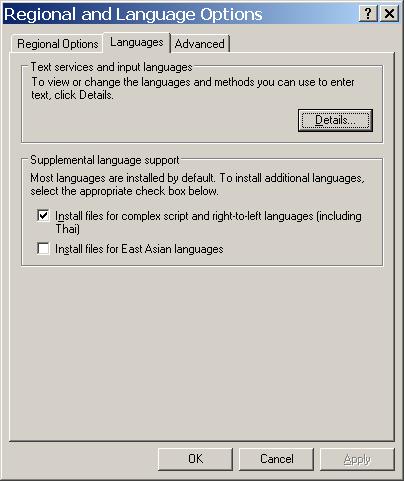
Select the "Languages" tab and check the "Install files for complex script and right-to-left languages (including Thai)" box as shown in Figure below:
Click Ok. You will be asked to insert the Windows XP setup disk or point to the location of the \I386 directory on your hard drive.
- You are now ready to run eiktub™ and create .txt files in Arabic using your English keyboard.

Copyright ©2007-2014 by LinguArabica, LLC. All Rights Reserved. Terms of Service